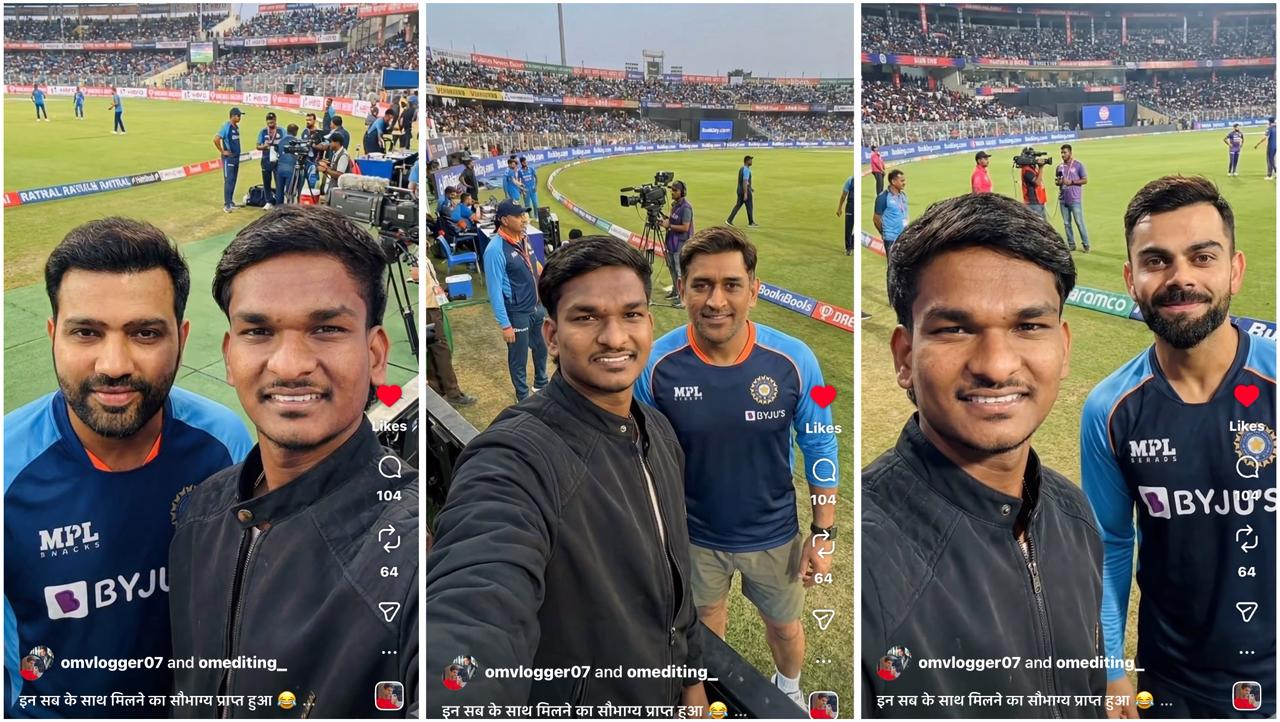
Want to create a realistic celebrity selfie video that looks like it was shot on a movie set? In this guide, you’ll learn how to generate celebrity selfie images and convert them into a cinematic selfie video in just a few clicks — no advanced editing skills required.
🎬 What You’ll Learn
- How to create a celebrity selfie image using AI
- How to turn images into a realistic selfie-style video
- How to keep your face 100% accurate (no face swap issues)
- How to export a final ready-to-share video
🧭 Step-by-Step Instructions
✅ Step 1: Create Your Celebrity Selfie Image
- Go to Image Generation
- Select Nano Banana Pro
- Upload one clear selfie of yourself
- Paste the prompt below and generate images
📝 Detailed Image Prompt (Virat Kohli)
Use my attached reference selfie as the main subject. Match my face one-to-one with the reference image — exact facial features, skin tone, bone structure, hairstyle, and natural expression. No face swapping, no stylization, no changes to my identity. Only adjust lighting and color grading to match the environment.
A realistic iPhone front-camera selfie taken inside a large international cricket stadium, with Virat Kohli standing beside me, posing naturally as if during a break before or after a match. Virat Kohli looks ultra-realistic, wearing official Indian cricket kit or training jersey, relaxed body language, slight confident smile, casually looking toward the camera.
Background: packed cricket stadium with green pitch visible, boundary ropes, LED advertising boards, stadium floodlights glowing, dugout area nearby. Ground staff, camera operators with broadcast cameras, photographers, and support staff are visible in the background. Some players and officials can be seen warming up or walking around.
Lighting: natural stadium floodlights combined with ambient daylight or evening light, soft balanced exposure on faces, realistic highlights on skin and fabric, subtle rim light from stadium lights, no harsh shadows.
Composition: vertical iPhone selfie at arm’s length, my face near the center, Virat Kohli slightly behind and to the side but clearly visible, shallow depth of field with crowd and stadium softly blurred.
Style: ultra-realistic, high-fidelity 8K quality, sharp details, natural skin texture, realistic jersey fabric and sweat details, authentic stadium atmosphere, no AI artifacts, no warped hands, no distortions, no text, no logos, no watermarks.
🔹 Simple Base Prompt (Reusable Template)
Use this when you want quick results and change only the celebrity or location:
Create a realistic, high-fidelity (8K) image based on the attached reference photo.
Maintain the exact facial features, skin tone, bone structure, hairstyle, and expression of the attached person, with no alteration or face swapping.

The attached person is taking a selfie with [Celebrity], standing at [Set/Location].
Crew members are adjusting internal lighting and equipment, with cables and gear visible.
Directors and managers are standing behind, discussing the next take.
📌 Tip: Generate at least 2 different images with slightly different angles or expressions.
🎥 Step 2: Convert Images into a Selfie Video
Once your images are ready:
- Go to Video
- Select Kling 2.5 Model
- Add:
- First image → Start Frame
- Second image → End Frame
📝 Video Motion Prompt
handheld vlog-style video. The same person from the start frame holds the camera at arm’s length, face locked and centered at all times.He smiles naturally and starts walking forward inside a large cricket stadium, moving from the first frame position toward the second frame position.Motion is smooth and realistic, like a real smartphone selfie video.His head, facial structure, skin tone, hairstyle, and expression remain identical to the start frame — no face change, no morphing.Background changes naturally as he walks: green cricket field, boundary rope, stadium crowd, floodlights, crew members, camera operators, and players warming up.People in the background move independently and realistically.The subject shows excitement and happiness through facial expression only (no talking, no lip movement).Camera remains steady, front-facing, slight natural hand movement.End the video exactly matching the end frame composition and angle, as if he stops walking and takes another selfie.Ultra-realistic, cinematic lighting, real-world physics, no blur, no distortion, no extra limbs.
This creates a natural selfie-vlogging motion while keeping the face stable and realistic.
⚡ Step 3: Final Editing & Export
Once all clips are generated:
- Import them into your preferred editing software
- CapCut
- Premiere Pro
- DaVinci Resolve
- Arrange clips in sequence
- Export as:
- One continuous video, or
- Multiple short clips for social media
🎉 VOILA — You’re DONE!
You now have a cinematic celebrity selfie video that looks realistic, professional, and social-media ready.
🔥 Pro Tips
- Always use clear, front-facing selfies
- Avoid heavy facial expressions in the reference photo
- Keep no talking for best realism
- Vertical format works best for Instagram Reels & Shorts